Why I Use Unix-Domain Sockets Behind nginx
I did not choose Unix-domain sockets to win a benchmark. I chose them so a same-host application would have no TCP port for a firewall mistake to expose. The performance is real; the access boundary is the reason.
The decision was not about a benchmark
Jump to: configuration · permissions · benchmarks · HTTP/2 and HTTP/3 · limitations.
A correctly configured service bound only to 127.0.0.1 does not suddenly become public because somebody opens a firewalld rule. The failure I want to remove is the combination: an application bind address changes and a firewall rule is broader than intended. A Unix-domain socket removes the application TCP listener from that equation.
Throughout the examples, the unit, account, runtime directory and socket are all named themadhatters_web, as they are on this site. If you borrow the layout, rename them together, SELinux types included.
When Node.js listens only at /run/themadhatters_web/themadhatters_web.sock, there is no application TCP port to open. In the service I am describing, systemd goes further and rejects attempts by the process to bind an IP socket. With that policy enforced, a future code change that tries to listen on 0.0.0.0:3000 fails instead of quietly changing the exposure of the machine.
nginx remains the network edge. It owns the public addresses, TLS, HTTP/2 and HTTP/3, request limits, and the forwarding contract. The application accepts local streams through one named filesystem object. The companion article, nginx Done Right—Well, How I Like It, covers that edge in detail.
From named pipes to nginx
Unix sockets felt familiar before I used them with nginx. I had developed Windows service applications that used named pipes for interprocess communication. When I ported those services to *nix, Unix-domain sockets were the natural equivalent: a local IPC endpoint with a name, an owner, permissions, and no requirement to invent a local TCP port.
I started focusing on them for web applications in late 2009, when nginx 0.8.21 added support for listening on Unix-domain sockets. The nginx upstream syntax now looks ordinary:
upstream themadhatters_web {
    server unix:/run/themadhatters_web/themadhatters_web.sock;
    keepalive 16;
}

location / {
    proxy_http_version 1.1;
    proxy_set_header Connection "";
    proxy_pass http://themadhatters_web;
}
The explicit HTTP/1.1 version and cleared Connection header make upstream keepalive work on nginx versions before 1.29.7, when it became the default.
That was the last period when I used a local application TCP port in production because I had no better choice. I still use TCP when the reverse proxy and application live on different hosts. Location transparency is TCP's great advantage; a filesystem socket is deliberately not location-transparent.
Remove the port, then enforce the decision
Merely changing listen(3000, "127.0.0.1") to a pathname removes the TCP listener from the application. The service unit makes that decision testable:
[Service]
User=%p
Group=%p
UMask=0077

RuntimeDirectory=%p
RuntimeDirectoryMode=0710

WorkingDirectory=/srv/%p/current
ExecStart=/usr/local/libexec/themadhatters_web-launch src/web.js --pidfile %t/%p/%p.pid --listen %t/%p/%p.sock

IPAddressDeny=any
SocketBindDeny=any
RestrictAddressFamilies=AF_UNIX AF_INET AF_INET6%p is the unit prefix, themadhatters_web, and %t expands to /run for a system service, so the socket lands at /run/themadhatters_web/themadhatters_web.sock. WorkingDirectory=/srv/%p/current anchors the relative application script; --listen and --pidfile are options this application's entry point accepts, not Node.js flags. The launcher is the root-owned wrapper that starts the pinned Node.js runtime inside the application's SELinux domain.
SocketBindDeny=any is the decisive line for listeners. The process may create the Unix socket it needs, but an IPv4 or IPv6 bind is denied. That is what makes the pathname a decision rather than a convention: a later change cannot reintroduce a port without systemd refusing it.
The other two lines are the confinement note's subject. IPAddressDeny=any blocks IP traffic for a site with nothing to talk to, AF_INET and AF_INET6 stay listed because the runtime touches those socket APIs without being allowed to use them, and both controls depend on kernel BPF support that I verify on the deployed host rather than assume from a clean unit-file parse.
Let nginx reach one pathname
The socket has two filesystem permission problems: reaching the pathname and connecting to the object at the end of it.
I originally kept runtime sockets under /var/run/<domain>/, then moved to the modern /run convention. Ultimately, I settled on systemd's RuntimeDirectory= to manage their lifetime.
RuntimeDirectory=%p tells systemd to create /run/themadhatters_web for themadhatters_web.service at service start, owned by the service identity. This is preferable to a mkdir hidden in ExecStartPre or a second tmpfiles.d lifecycle. The service manager already knows when the directory should exist, who owns it, and when it should disappear.
The mode is 0710:
- The application owner receives read, write, and search permission.
- The application group receives search permission, so a member can traverse to a known pathname.
- The group cannot list the directory because it has no read permission there.
- Everyone else receives no permission.
That last path component is a socket, not a regular file nginx opens and reads. On Linux, a client needs write permission on the socket inode to connect. The application therefore shares that one object as 0660 after it has successfully bound.
The order is intentional. UMask=0077 makes the freshly created socket private. An after-listen hook then calls lstat, refuses to touch the path unless it is a socket, and changes that socket to 0660. I do not use a permissive umask merely to make one IPC object accessible.
In simplified Node.js:
const socket = await lstat(socketPath);
if (!socket.isSocket()) {
    throw new TypeError("Refusing to change permissions on a non-socket path");
}
await chmod(socketPath, 0o660);
The nginx worker account belongs to the application's group. Ordinary service accounts do not. Group membership, directory traversal, and the socket mode must agree; changing only one of them produces either a 502 Bad Gateway or a wider local audience than intended.
Unix permissions are only the first lock
Discretionary access control answers whether a Unix identity can traverse the directory and connect to the socket. SELinux answers whether this kind of process may perform that operation on this kind of object.
The SELinux policy uses application-specific types. Following the illustrative naming convention here, those are:
httpd_tfor nginx;themadhatters_web_tfor the Node.js process; andthemadhatters_web_runtime_tfor the directory, PID file, temporary files, and socket under/run/themadhatters_web.
The reviewed policy gives nginx the pathname access and peer-domain connection it needs. It does not grant nginx a general bridge to every service that happens to run unconfined. Conversely, an unrelated systemd service does not gain access merely because it also uses /run or can guess the socket name.
This is defense in depth, not a claim that no other process on the host could ever connect. Root, a process running under the same Unix identity, a member of the application group, or a domain explicitly authorized by policy changes the analysis. The boundary is useful precisely because those exceptions can be named and reviewed.
I will admit how my first 502 from this socket got fixed: I widened the permissions until nginx could connect. It worked, which is the problem with the easy route. A 502 that disappears when you loosen something has just shown you exactly where the boundary is, and I had responded by moving it. So I put the mode back and spent the night I should have expected on it—the audit log, ls -Z, and a detour through how one domain is actually authorized to connect to another. That detour is the part of this work I like best. The harder road here is one directory mode and a few lines of policy; the easy one is always available, and that's not an argument for it. Check both locks:
stat -Lc '%U:%G:%a %n' /run/themadhatters_web /run/themadhatters_web/themadhatters_web.sock
ls -ldZ /run/themadhatters_web /run/themadhatters_web/themadhatters_web.sock
sudo -u nginx test -x /run/themadhatters_web
curl --unix-socket /run/themadhatters_web/themadhatters_web.sock http://localhost/~/health
The test -x command checks directory traversal under the nginx Unix account. The direct curl runs under the caller's identity and SELinux domain, so its success does not prove a worker in httpd_t can connect. The HTTPS probe through nginx exercises that actual worker path. Labels, process domains, group membership, and effective policy all contribute to the result.
The socket has a lifecycle
A filesystem Unix socket leaves a pathname behind. On a graceful close, Node.js removes a socket it created through its server abstraction. After a crash, however, the pathname can remain until something unlinks it. A stale socket can turn a restart into EADDRINUSE or make a superficial file-exists check report health when no process is listening.
This is another reason to let systemd own the runtime directory. With the default RuntimeDirectoryPreserve=no, systemd removes the directory when the unit stops and creates it again for the next start. /run itself is temporary across boot. That gives the PID file, temporary files, and socket one lifecycle tied to the service rather than a collection of cleanup commands with different failure behavior.
There is still application work to do. Graceful shutdown must close the listener and drain requests. Reload behavior must not unlink a socket while replacement workers still need it. Monitoring must connect, not just test that a pathname exists. If a service uses RuntimeDirectoryPreserve=restart or yes, it has chosen a different cleanup contract and must handle stale sockets explicitly.
Observe the path that matters
Removing a port does not remove observability. It changes the tools.
A direct application probe bypasses nginx and connects through the same socket nginx uses:
curl --fail --silent --show-error \
    --unix-socket /run/themadhatters_web/themadhatters_web.sock \
    http://localhost/~/health
That answers, “Is this application accepting and serving through its intended local transport?” A second HTTPS probe through nginx answers, “Does the complete public path work?” Both are useful; neither substitutes for the other.
For diagnosis, ss -xlpn shows listening Unix sockets, stat shows ownership and modes, ls -Z shows labels, ps -Z shows process domains, and the nginx error log distinguishes connection failures from application responses. Port scanners and curl 127.0.0.1:3000 are no longer the right checks. That is a small operational retraining cost, not lost visibility.
Faster, but not by decree
Unix-domain sockets normally avoid work that loopback TCP still performs: IP addressing, routing and TCP protocol handling. The difference is measurable, especially when many small request-response exchanges make transport overhead a meaningful part of the workload.
Before publishing this revision, I ran a deliberately small benchmark of my own. It is closer to this site's upstream than a raw socket test, but it is still a microbenchmark—not a measurement through nginx or of this Fastify application.
The harness runs a minimal fixed-response Node.js HTTP/1.1 server in one process and the client in another. Each response carries 1 KiB. Both transports reuse connections. TCP binds only to 127.0.0.1 on an ephemeral port; UDS uses a unique filesystem socket. Each of seven trials warms 1,000 requests, measures 10,000 sequential round trips, then completes 50,000 requests at concurrency 16. The transport order alternates by trial.
I ran it on September 6, 2026, on the production host: Node.js 26.8.1, CentOS Stream 10, Linux 6.12.0-264, two logical vCPUs identified as AMD EPYC 7713, and 3.8 GB of memory. The benchmark ran at niceness 10 to reduce its CPU scheduling priority. That reduces its preference for CPU time under contention; it does not guarantee the live service is unaffected.
Across the seven trials, loopback TCP's median-of-medians round trip was 153.75 µs; UDS was 119.93 µs—22.0% lower. The ranges of the per-trial medians were 143.81–167.36 µs for TCP and 118.93–126.17 µs for UDS. At concurrency 16, median throughput was 10,382 requests per second for TCP and 14,168 for UDS—36.5% higher—with per-trial ranges of 10,124–10,696 and 13,535–14,681 requests per second. UDS won all seven trials on both measurements.
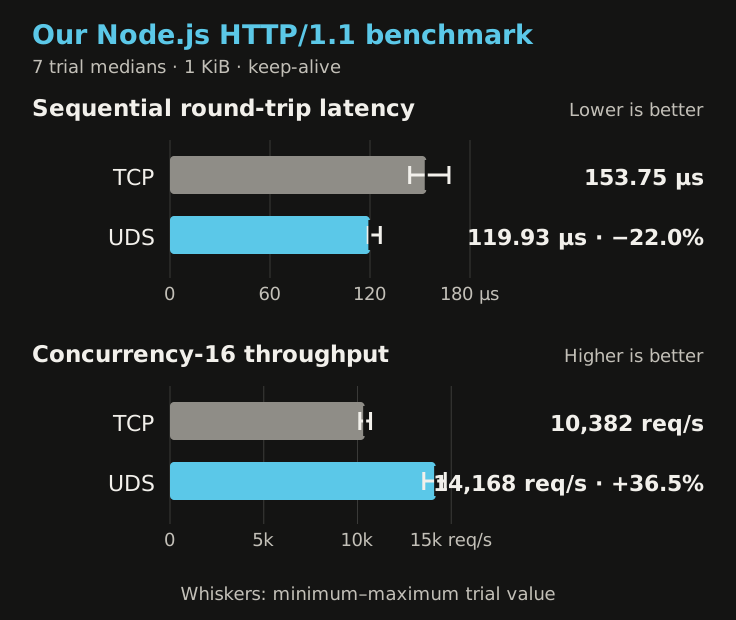
Those absolute numbers include Node's client and server HTTP work, process scheduling, and virtual-machine effects. They do not predict browser latency, and the throughput test measures combined client/server capacity on a two-vCPU host. The result supports the direction of the claim on this machine; it does not turn 22.0% or 36.5% into a universal constant.
The downloadable benchmark kit contains the standalone benchmark-http-transports.mjs harness, our complete seven-trial output in our-node-http-benchmark.json, and the published-paper chart inputs in performance-data.json. It uses only Node.js built-in modules. Extract the archive, open a terminal in the extracted directory, and run this on a Linux test host with Node.js 26.8.1 to repeat the same workload:
nice -n 10 node benchmark-http-transports.mjs \
    --trials 7 \
    --warmup-requests 1000 \
    --latency-requests 10000 \
    --throughput-requests 50000 \
    --concurrency 16 \
    --payload-bytes 1024 \
    --output results.json
Run it outside the application's network-restricted systemd service: the TCP half needs permission to bind a loopback socket. Expect your machine's results to differ, and keep the recorded environment and every trial with any numbers you share.
The kit's README explains the method and includes checksum verification. The current harness adds cancellation and child-process cleanup fixes; the exact source used for the recorded run is included separately for provenance. Those fixes do not retroactively change the measured results.
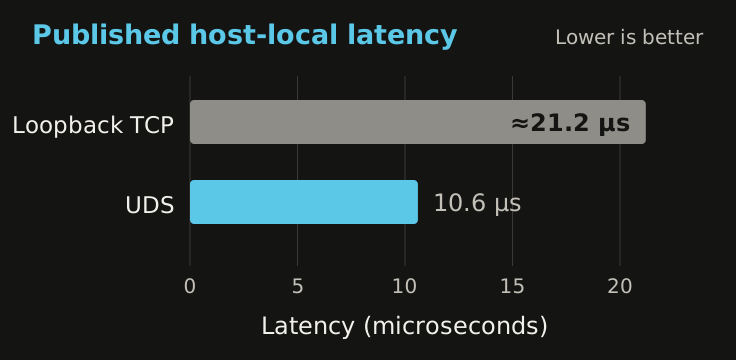
The published references remain useful as an independent check. The 2015 USENIX ATC paper Slipstream: Automatic Interprocess Communication Optimization tested a lower-level path: its Linux prototype replaced host-local TCP streams with Unix-domain sockets while preserving the TCP-facing application interface.
The paper reported about 10.6 microseconds of latency after the local stream moved to UDS—about half its original loopback TCP latency.
Throughput was more complicated. The paper's Netperf results show why “UDS is 30–50% faster” is not a law:
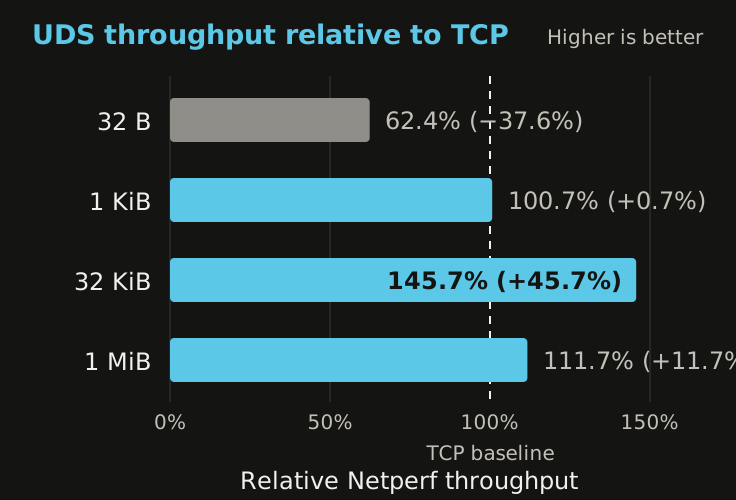
The underlying measurements, in MB/s, were:
- 32 bytes: TCP 98.28; UDS 61.36—UDS was 37.6% slower.
- 1 KiB: TCP 1,625.83; UDS 1,636.47—effectively even.
- 32 KiB: TCP 3,891.92; UDS 5,670.26—UDS was 45.7% faster.
- 1 MiB: TCP 5,193.10; UDS 5,801.53—UDS was 11.7% faster.
Those tests used Ubuntu 14.04 and Linux 3.13 on a four-core workstation. They were not nginx, Node.js, this application, or a current kernel. The small-transfer reversal was attributed to TCP buffer coalescing in the baseline, and changing the UDS receive-buffer configuration materially changed the larger-transfer results. The data establishes that transport choice can matter—and that buffer sizes, message sizes, and methodology matter too.
On a small site where nginx serves static assets and Node.js renders a modest response, the saved transport work may be lost in ordinary framework, template, and application time. I still take the efficiency. I just do not use it to justify the architecture.
HTTP/2 and HTTP/3 are separate hops
Using a Unix-domain socket does not stop visitors from using HTTP/2 or HTTP/3. The request has two distinct transport relationships:
Browser -- HTTP/2 or HTTP/3 over the network --> nginx
nginx  -- HTTP/1.1 or HTTP/2 over a Unix stream --> Node.js
nginx terminates the client connection. It can accept HTTP/2 over TCP/TLS and HTTP/3 over QUIC/UDP, then create a separate upstream request over the Unix socket. The browser does not know or care how that second hop is addressed.
For many years nginx's HTTP proxy module spoke HTTP/1.x upstream. Current nginx supports proxy_http_version 2 as of 1.29.4. Its documentation treats the upstream HTTP version and the proxy_pass address—including a Unix-domain socket—as separate choices. That makes HTTP/2 over the local stream possible when the nginx build and Node backend both support the required cleartext HTTP/2 behavior, but I would verify the exact combination before relying on it. Existing deployments on older nginx versions remain HTTP/1.x upstream.
HTTP/3 is different. HTTP/3 runs over QUIC, and QUIC runs over UDP. It does not run over a filesystem Unix stream socket. nginx can terminate HTTP/3 at the public edge and proxy the request locally as HTTP/1.1 or HTTP/2; it cannot preserve QUIC as the protocol on this UDS hop.
Is that a limitation? Yes, if the requirement is HTTP/3 all the way to the application process. It is not a limitation on what the visitor negotiates, and it is rarely a useful goal on one host. QUIC's connection migration and loss-recovery design solve network problems that do not exist between two local processes. HTTP/2 multiplexing can sometimes be useful upstream, but nginx keepalive connections over HTTP/1.1 are a simple and well-understood fit for this site.
What the socket gives up
The choice is deliberately narrow:
- Same host, usually the same filesystem namespace. Move nginx or Node.js to another machine and the pathname no longer joins them. Containers need an explicitly shared socket directory and compatible identities and labels.
- Less deployment location freedom. TCP makes it easy to move an upstream behind DNS, a load balancer, or service discovery. UDS turns that future change into an explicit transport migration.
- More filesystem policy. Directory search permission, socket mode, umask, group membership, lifecycle, and mandatory access control all have to agree.
- A persistent name. A crash can leave a stale pathname. File existence is not readiness.
- Platform-specific limits. Filesystem socket paths have small operating-system-specific length limits, and Windows named pipes have different naming and cleanup semantics.
- Different tooling. Generic TCP health checks and port-oriented dashboards need a Unix-socket-aware probe or a check through nginx.
- No automatic confidentiality or identity. The bytes do not need TLS merely because they use a pathname, but UDS does not encrypt them or prove which application-level peer connected. Filesystem permissions, peer credentials when used, SELinux, and process isolation supply the local boundary.
- No universal speedup. A benchmark can favor TCP for a particular buffer size or workload. Measure if performance is the reason for the change.
When the proxy and application are on different hosts, I use TCP and secure that real network boundary appropriately. When they share one Linux host, I prefer the transport whose scope matches the architecture.
The practical rule
For a same-host Node.js application behind nginx, a Unix-domain socket removes an unnecessary application port and replaces network reachability with a reviewable local contract:
- systemd creates and removes the runtime directory;
- a restrictive umask keeps the socket private during creation;
- the application opens only the bound socket to its group;
- nginx receives traversal and connection access, not a broadly readable directory;
- SELinux authorizes the exact proxy-to-application relationship;
- direct and public probes verify both halves; and
- systemd rejects a future attempt to reintroduce an IP listener.
That is more configuration than localhost:3000. It is also a more honest description of the system: nginx is the network service; Node.js is a local application behind it. Seven lines of configuration for a boundary I can name is a trade I'll take every time.
One related topic deserves its own treatment: systemd socket activation, where the service manager owns the listening socket and starts the application on demand. That note is coming: on-demand startup, the application's separate idle-shutdown policy, and what changes when systemd, not Node.js, creates the socket.
Sources and further reading
- nginx HTTP core documentation dates Unix-domain listeners to version 0.8.21.
- nginx upstream documentation documents Unix-socket upstream addresses and mixed TCP/UDS groups.
- nginx proxy documentation documents upstream HTTP versions, including HTTP/2 since 1.29.4.
- nginx HTTP/3 documentation covers the public QUIC/HTTP/3 listener.
- systemd.exec documents runtime-directory ownership, modes, lifetime, and
RuntimeDirectoryPreserve=. - systemd.resource-control documents IP-address and socket-bind restrictions.
- Node.js IPC documentation documents filesystem socket path limits and cleanup after close or crash.
- Linux unix(7) documents pathname socket permissions and portability differences.
- Red Hat's custom SELinux policy guide explains process domains, file labels, and reviewed local policy.
- Our benchmark kit includes the Node.js HTTP transport harness and complete seven-trial output in
our-node-http-benchmark.json. - Dietz, Cranmer, Dautenhahn, and Adve, Slipstream: Automatic Interprocess Communication Optimization, USENIX ATC 2015. The chart inputs are included in the benchmark kit as
performance-data.json. - The broader containment design is covered separately in The Node.js Website That Cannot Reach the Internet.